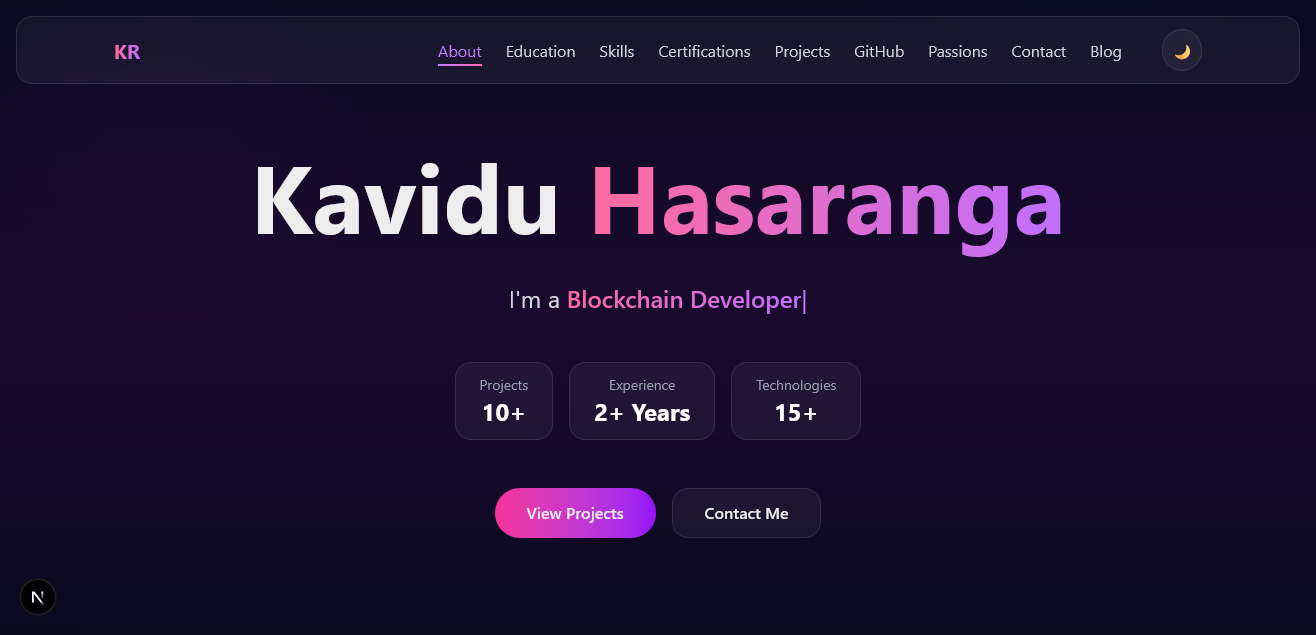
Personal Portfolio — kaviduhasaranga.me
A fully custom personal portfolio and blog site built with Next.js 15 and React. Blog posts and project write-ups are authored as plain Markdown files — no CMS, no database, no backend required.
Live: kaviduhasaranga.me · GitHub: kaviduhasaranga.me
Overview
After years of working on backend systems, billing apps, and mobile projects, I wanted a place that actually represented me — not a template, not a drag-and-drop site builder. So I built one from scratch.
The key design goal was content-first simplicity: write a Markdown file, drop it in the right folder, and it appears on the site. No database migrations. No admin panel. No CMS login. Just files.
The site covers everything: who I am, what I've built, certifications I've earned, my GitHub activity, communities I'm part of, and a personal blog.
Tech Stack
| Layer | Technology |
|---|---|
| Framework | Next.js 15 (App Router) |
| UI | React 19 |
| Styling | Tailwind CSS v4, Vanilla CSS |
| Markdown | gray-matter, remark, remark-html |
| Deployment | VPS |
| Fonts | Google Fonts (Inter) |
Architecture
The site is entirely statically generated at build time. Pages are rendered server-side using Next.js App Router, with Markdown parsed at build time via gray-matter and remark.
content/
├── blogs/          ← Blog posts as .md files
└── projects/       ← Project write-ups as .md files
    └── images/     ← Project screenshots & cover images

src/
├── app/
│   ├── page.tsx              ← Home page (all sections)
│   ├── blog/[slug]/          ← Dynamic blog post route
│   └── projects/[slug]/      ← Dynamic project detail route
├── components/
│   ├── Hero.tsx
│   ├── About.tsx
│   ├── Education.tsx
│   ├── Skills.tsx
│   ├── Certifications.tsx
│   ├── Projects.tsx
│   ├── Github.tsx
│   ├── Passions.tsx
│   ├── Contact.tsx
│   ├── Blog.tsx
│   ├── ProjectDetailPage.tsx
│   ├── BlogPostPage.tsx
│   └── MarkdownRenderer.tsx
└── data/
    └── projects.ts           ← Project metadata (slug, tech, links)
Content System
Projects and blog posts are decoupled from their metadata:
src/data/projects.tsstores structured metadata: title, tech stack, GitHub link, live demo URL, cover image path, and screenshot paths.content/projects/<slug>.mdstores the full write-up: architecture, code snippets, challenges, learnings — authored in Markdown.
At build time, the [slug] dynamic route reads the matching .md file, parses it with gray-matter + remark, and passes the HTML to MarkdownRenderer for rendering with custom styling.
// Simplified: reading a markdown file for a project detail page
import fs from 'fs';
import path from 'path';
import matter from 'gray-matter';
import { remark } from 'remark';
import html from 'remark-html';

export async function getProjectContent(slug: string) {
  const filePath = path.join(process.cwd(), 'content/projects', `${slug}.md`);
  const raw = fs.readFileSync(filePath, 'utf-8');
  const { content } = matter(raw);
  const processed = await remark().use(html).process(content);
  return processed.toString();
}
This pattern means adding a new project is just:
- Add an entry to
projects.ts - Drop a
.mdfile incontent/projects/
No redeployment config needed — Vercel picks it up on the next push.
Key Components
Hero
Animated introduction section with name, role, and a brief tagline. Uses CSS keyframe animations for the entrance effect.
Projects
Horizontally scrollable project card carousel. Each card shows the cover image, title, description, and tech stack badges. Clicking the image or title navigates to the full project detail page.
ProjectDetailPage
Renders the full Markdown write-up alongside a screenshot gallery. Screenshots are defined in projects.ts and displayed as a responsive image grid.
Blog
Lists all blog posts from content/blogs/ sorted by date, with title, date, and a short excerpt. Each post links to its own blog/[slug] page.
MarkdownRenderer
A custom component that applies consistent Tailwind/CSS styling to the raw HTML output from remark — headings, code blocks, tables, blockquotes, and inline code all have their own visual treatment to match the site's dark theme.
Github
Embeds a live GitHub contribution graph and recent activity summary, giving visitors a real-time pulse of what I'm working on.
Design Decisions
No CMS
A headless CMS (Contentful, Sanity, etc.) would add complexity and a monthly cost for what is essentially a static content problem. Markdown files in Git are versioned, portable, and editable in any editor — the same tools I use for code.
Static Generation Over SSR
All pages are statically generated. There's no dynamic data that requires server-side rendering on each request. This means the site is fast, cheap to host, and can be served entirely from Vercel's edge network.
Tailwind CSS v4
The project uses Tailwind CSS v4 (alpha/beta at the time of development), which introduces a CSS-first configuration model — no more tailwind.config.js. The entire design token setup lives in globals.css.
Component-Per-Section Architecture
Each homepage section (Hero, About, Skills, etc.) is its own isolated component. This makes it easy to reorder sections, add new ones, or disable them without touching the rest of the page structure.
Deployment
The site is deployed on Vercel with automatic deployments on every push to main.
# Local development
npm run dev

# Production build (run before pushing to verify)
npm run build
Vercel handles:
- SSL termination
- Global CDN distribution
- Automatic preview deployments for pull requests
- Custom domain (
kaviduhasaranga.me) with DNS managed via the Vercel dashboard
What I Learned
- Building a content pipeline with Markdown + gray-matter + remark entirely without a database
- Next.js 15 App Router patterns: dynamic routes, server components, and static generation with
generateStaticParams - Tailwind CSS v4 CSS-first configuration — a significant shift from v3's JS config model
- Designing a component-per-section homepage architecture that stays maintainable as the site grows
- Balancing performance and aesthetics: keeping Lighthouse scores high while using animations, large images, and rich layouts