Go4: AI-Powered Multimodal Retail Guide
A Flutter-based mobile application that acts as an intelligent, AI-powered shopping guide — helping users discover products, compare options, and make informed purchase decisions through voice, image, and text interactions.
GitHub: Go4-Group-Project
Overview
Go4 is a multimodal AI retail guide built as a group university project. The app bridges the gap between traditional product browsing and intelligent recommendation — letting users interact via text, voice, or by scanning product images to get instant AI-driven insights.
Through real-time collaboration between team members, the project integrates Google's Gemini API for multimodal understanding, SQLite for local data persistence, and a Node.js/Express backend for product catalog management.
Team & Collaboration
This was a collaborative group project developed during the second year of university. Our team of four worked across the full stack — mobile frontend, backend API, AI integration, and database design.
Key responsibilities I handled:
- Product Catalog Module — designed and built the item listing, search, and filter screens in Flutter
- Backend Integration — connected the Flutter app to the Node.js REST API using HTTP and Dio
- SQLite Local Cache — implemented offline-first caching for frequently accessed product data
- Gemini API Wiring — integrated the Gemini multimodal API for image-based product recognition
The team used Git for version control, with feature branches and pull request reviews keeping work organised across parallel workstreams. We held weekly syncs to align on API contracts and shared design decisions through Figma prototypes.
Tech Stack
| Layer | Technology |
|---|---|
| Mobile | Flutter (Dart) |
| Backend | Node.js, Express |
| Database | SQLite |
| AI / ML | Google Gemini API (multimodal) |
| Design | Figma |
Core Features
The application covers several interconnected modules:
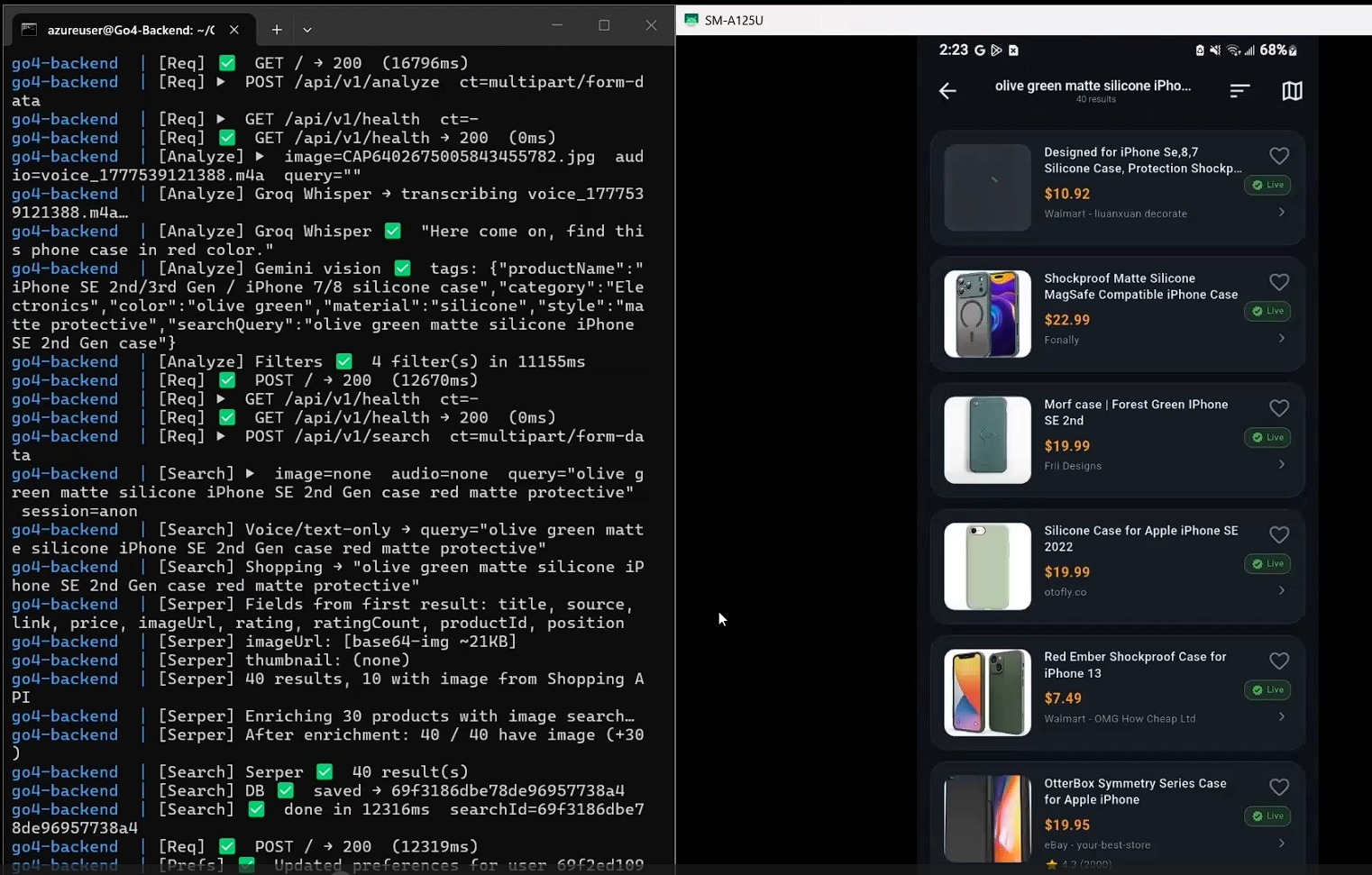
- Multimodal Product Search — Users can type a query, speak it, or photograph a product. The Gemini API processes all three input types and returns structured product recommendations.
- AI Product Guide — A conversational chat interface powered by Gemini that answers product questions, compares items, and suggests alternatives based on user preferences.
- Product Catalog — Browse and filter a local product catalog with category tabs, price sorting, and full-text search backed by SQLite.
- Image Recognition — Point the camera at any product or barcode; the app identifies it and surfaces relevant catalog matches or AI descriptions.
- Saved Favourites — Users can bookmark products and view a persistent favourites list stored locally.
Architecture & Infrastructure
Go4 follows a clean layered architecture separating concerns between the Flutter frontend and the Express backend:
Flutter App
    │
    │  REST (HTTP/JSON)
    ▼
Express API
├── /products      Product CRUD + search
├── /categories    Category listings
└── /ai            Gemini proxy endpoint
    │
    │  SQLite (local on device)
    ▼
SQLite DB (Flutter sqflite)
Gemini Proxy Pattern: Rather than calling Gemini directly from the app (which would expose the API key), the Express backend acts as a proxy — the Flutter app sends the user's query + optional image bytes to /ai, and the backend forwards it to Gemini and returns the structured response.
Flutter State Management: Provider was used for global app state (cart, favourites, current user session).
File Structure Highlights
The Flutter project follows a feature-first folder structure for maintainability:
lib/
├── main.dart
├── core/
│   ├── constants.dart
│   ├── theme.dart
│   └── router.dart
├── features/
│   ├── catalog/
│   │   ├── screens/
│   │   │   ├── catalog_screen.dart
│   │   │   └── product_detail_screen.dart
│   │   ├── widgets/
│   │   │   ├── product_card.dart
│   │   │   └── category_chip.dart
│   │   └── providers/
│   │       └── catalog_provider.dart
│   ├── ai_guide/
│   │   ├── screens/
│   │   │   └── ai_chat_screen.dart
│   │   └── providers/
│   │       └── gemini_provider.dart
│   ├── scanner/
│   │   └── screens/
│   │       └── scanner_screen.dart
│   └── favourites/
│       ├── screens/
│       │   └── favourites_screen.dart
│       └── providers/
│           └── favourites_provider.dart
└── shared/
    ├── widgets/
    └── services/
        ├── api_service.dart
        └── db_service.dart
Challenges & Solutions
Challenge: Multimodal Input Unification
Handling three different input types (text, voice, image) and routing them all through a single coherent AI pipeline was architecturally complex.
Solution: Built a unified AiQuery model class that wraps the input type and payload, and a single GeminiProvider.query(AiQuery) method that serialises the payload correctly before calling the backend proxy — keeping all three input paths converging at one point.
Challenge: SQLite Schema Migrations
During development the product schema changed multiple times, causing migration headaches with sqflite.
Solution: Implemented a versioned migration system in db_service.dart using sqflite's onUpgrade callback with explicit version checks — ensuring clean upgrades without data loss across team members' devices.
Challenge: API Key Security on Mobile
Embedding the Gemini API key directly in the Flutter app would expose it in the compiled binary.
Solution: All Gemini calls are proxied through the Express backend. The API key lives only in the server's environment variables (.env), never in the mobile codebase.
What I Learned
- Integrating a multimodal LLM into a real product — handling image bytes, prompts, and structured JSON responses from Gemini
- Building a Flutter app with a clean feature-first architecture that scales across a team
- Coordinating backend API contracts with multiple frontend developers simultaneously
- SQLite migration strategies for evolving schemas in a mobile context
- The importance of a proxy pattern for API key security in mobile applications